

If you’re serious about cutting utility bills and making your house more comfortable year‑round, thermal imaging is one of the most powerful tools you can use. Once reserved for contractors and energy auditors, this technology is now affordable and accessible to everyday homeowners—and it can reveal invisible problems that are quietly draining your wallet.

Below, you’ll learn what thermal imaging is, how it works in a home, the most common issues it uncovers, and how to turn those colorful heat maps into real energy savings.
What Is Thermal Imaging and How Does It Work?
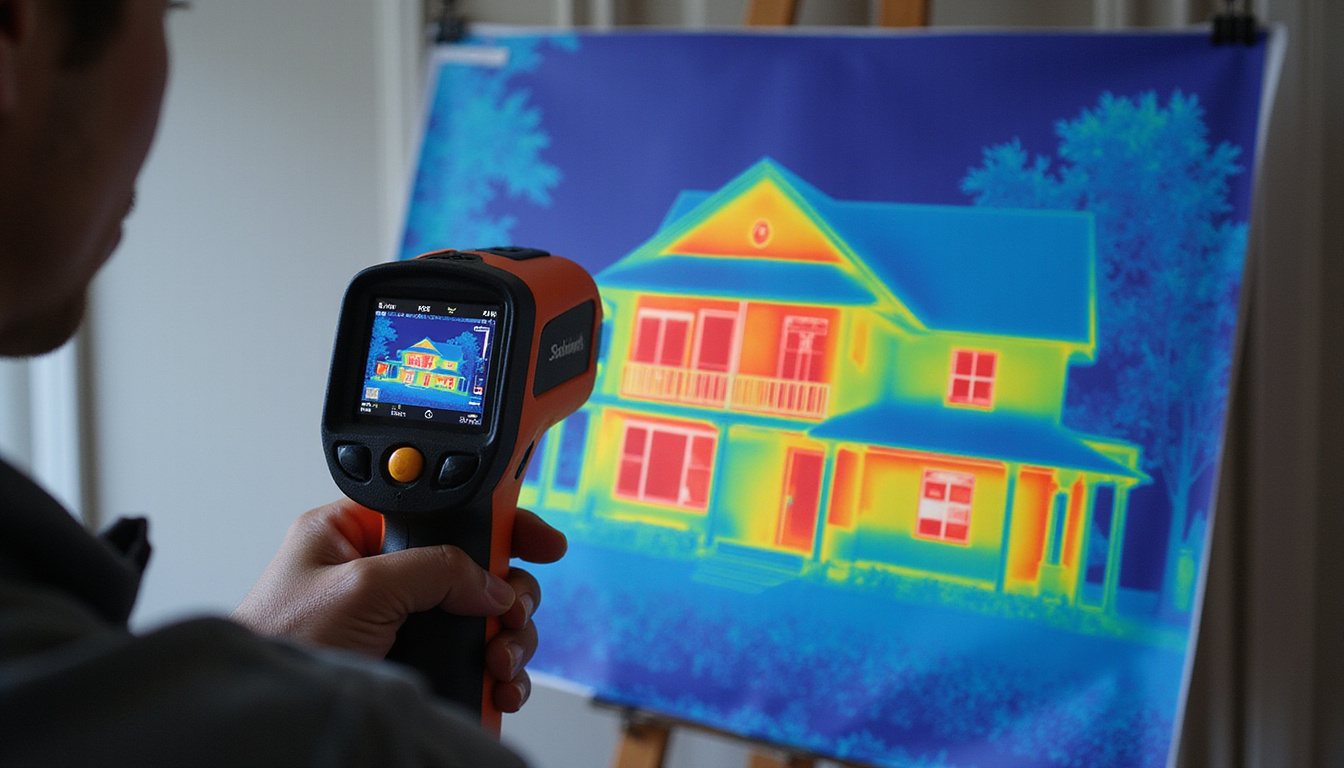
Thermal imaging (also called infrared imaging or thermography) uses infrared cameras to detect tiny differences in surface temperature. Instead of capturing visible light like a regular camera, a thermal camera “sees” heat and converts it into a color image.
- Warmer areas often appear as yellow, orange, or red.
- Cooler areas often appear as blue, purple, or dark tones.
In a home, this allows you to literally see where heat is escaping in winter, where hot air is sneaking in during summer, and where your HVAC system is working harder than it should.
Why Homeowners Are Turning to Thermal Imaging
Energy loss is often invisible. You can feel drafts and notice cold rooms, but you can’t see:
- Gaps hidden behind drywall
- Missing insulation in ceilings
- Air leaks around recessed lights or window frames
- Hot spots in electrical systems that may pose safety risks
Thermal imaging exposes these issues in minutes, so you can fix what matters most instead of guessing and wasting time and money.
The Biggest Energy Wasters Thermal Imaging Reveals
When you scan your home with a thermal camera or hire an energy auditor, you’ll almost always uncover patterns of heat loss and gain. These are the usual suspects.
1. Poor or Missing Insulation
Insulation problems are among the top causes of high heating and cooling bills. With thermal imaging, you can quickly see:
- Cold streaks in walls or ceilings where insulation has settled or was never installed
- Hot or cold patches around attic access hatches, suggesting gaps or weak insulation
- Uneven temperatures between rooms, pointing to inconsistent insulation coverage
These thermal patterns help you target where to add or upgrade insulation, instead of insulating blindly.
2. Air Leaks and Drafts
Tiny openings can add up to the equivalent of leaving a window open 24/7. Thermal imaging helps you pinpoint:
- Drafty window and door frames
- Leaks around baseboards and outlets on exterior walls
- Gaps at attic doors, pull-down stairs, and knee walls
- Air leakage around fireplaces and chimneys
Combine thermal imaging with a blower door test, and air leaks become even more obvious as the pressure difference exaggerates the temperature change.
3. Problem Areas in Attics and Roofs
Attics are one of the biggest energy weak points in many homes. Thermal imaging often shows:
- Hot roof lines in summer, indicating poor ventilation or inadequate insulation
- Cold zones on ceilings in winter, showing where heat is escaping to the attic
- Thermal bridges—framing or beams conducting heat more easily than insulated areas
By correcting these, you reduce the workload on your HVAC system and make upstairs rooms more comfortable.
4. Hidden Moisture and Potential Mold Issues
While thermal imaging doesn’t see water directly, moisture‑damaged materials often change temperature as they evaporate. Thermal cameras can reveal:
- Damp areas behind showers, tubs, or sinks
- Potential leaks around roof penetrations (vents, chimneys, skylights)
- Hidden moisture in basements or crawl spaces
Catch these early and you not only save energy (wet insulation performs poorly) but also avoid structural and health problems.
5. Inefficient Windows and Doors
Windows and doors are obvious places for energy loss, but thermal imaging shows exactly how and where they’re failing:
- Cold glass surfaces in winter (single‑pane or low‑quality double‑pane)
- Heat radiating in through sun‑exposed windows in summer
- Severe temperature differences at the edges of frames—a sign of poor sealing or bad installation
This helps you decide whether to replace, retrofit, or simply upgrade weatherstripping.
DIY vs Professional Thermal Imaging: Which Is Right for You?
You can benefit from thermal imaging whether you want a quick DIY check or a detailed professional energy audit.
Using Thermal Imaging Yourself
Homeowners now have several options:
- Standalone thermal cameras: Handheld devices dedicated to infrared imaging.
- Smartphone attachments: Small thermal camera modules that plug into your phone and use an app.
- “Smart” inspection gadgets: Some inspection devices and smart home tools now include basic thermal imaging.
If you go the DIY route:
-
Choose the right time:
- For winter scans, pick a cold day and run the heat so the inside is noticeably warmer than outdoors.
- For summer scans, a hot day with AC running is ideal. A bigger temperature difference makes issues easier to spot.
-
Let temperatures stabilize:
Run your HVAC system for at least an hour before scanning, so walls and surfaces reflect typical operating conditions. -
Scan systematically:
Move slowly, checking:- Exterior walls (inside and out if possible)
- Around doors and windows
- Ceilings under attics
- Around electrical panels and major appliances
-
Take and label images:
Photograph key problem spots and label them so you can refer back when planning upgrades.
When to Call a Professional
A professional energy auditor or thermographer brings:
- Higher‑resolution, more sensitive cameras
- Experience interpreting subtle patterns
- Tools like blower door tests and duct leakage tests
- A written report with prioritized recommendations and estimated savings
This is especially valuable if you’re planning major improvements, buying an older home, or suspect complex issues like hidden moisture or poor ductwork.
Many utility companies and local governments offer rebates or subsidized home energy audits (source: U.S. Department of Energy). It’s worth checking before you hire someone privately.
Turning Thermal Images into Real Energy Savings
Thermal imaging only saves you money if you act on what you see. Use the findings to create a focused, step‑by‑step plan.
1. Prioritize High‑Impact Fixes
Start with changes that offer strong savings for relatively low cost:
- Seal major air leaks with caulk and foam (around windows, doors, and penetrations).
- Add or replace weatherstripping on exterior doors.
- Seal gaps in attic access hatches and insulate the hatch cover.
- Address obvious missing insulation spots identified by the camera.
These often yield noticeable comfort improvements within days.
2. Plan Strategic Insulation Upgrades
Based on your thermal imaging results, consider:
- Attic insulation top‑ups in thin or cold spots, bringing levels to or above your regional recommendation (R‑value).
- Wall insulation retrofits for older homes with clear cold streaks in winter.
- Basement or crawl space insulation where floors above feel cold or walls show heat loss.
Use your thermal images to show insulation contractors exactly where the problems are, so estimates and work are more precise.
3. Optimize Windows and Doors
Depending on what the camera reveals:
- Add or improve caulking and weatherstripping.
- Use thermal curtains or cellular shades on problem windows.
- Consider applying low‑emissivity (low‑E) films to reduce heat gain in sunny climates.
- When replacement is justified, choose Energy Star–rated windows and doors suitable for your climate.
Thermal imaging before and after replacement gives visual proof of improvement.
4. Improve HVAC Efficiency
Thermal patterns can highlight:
- Rooms that are consistently hotter or colder than others
- Potentially under‑insulated ductwork in attics or crawl spaces
- Supply or return vents that are blocked or poorly placed
Actions you can take:
- Seal and insulate accessible ducts in unconditioned spaces.
- Balance airflow by adjusting vents and, if needed, have ducts professionally tested and modified.
- Ensure furniture and rugs aren’t blocking vents.
Combined with a tune‑up of your HVAC system, these changes can significantly cut energy use.
Common Mistakes to Avoid with Thermal Imaging
To get accurate, useful results:
- Don’t scan during mild weather with small indoor-outdoor temperature differences; issues will be harder to see.
- Avoid direct sunlight on surfaces when possible; it can warm walls unevenly and distort thermal patterns.
- Don’t assume every color variation is a problem—some differences are structural or expected (e.g., studs vs insulated cavities).
- Use thermal imaging as a guide, not a diagnosis—confirm issues with physical inspection when possible.
If something looks suspicious and you’re not sure, a professional thermographer or energy auditor can help interpret the images.
Simple Checklist: Getting Started with Home Thermal Imaging
Use this quick list when you’re ready to explore thermal imaging for your home:
- Decide whether to rent/borrow a thermal camera, buy a smartphone attachment, or hire a professional.
- Pick an appropriate season and time of day with a strong temperature difference.
- Run your heating or cooling system for an hour to stabilize indoor temperatures.
- Systematically scan and capture images of:
- Exterior walls, inside and out
- Windows and doors
- Ceilings below attics
- Basements or crawl spaces
- Around outlets, vents, and pipes
- Label and organize your photos.
- Make a prioritized action plan based on the most severe issues.
- Re‑scan key areas after fixes to confirm improvement.
FAQ: Home Energy Savings with Thermal Imaging
Q1: How much can thermal imaging reduce my home energy bills?
Thermal imaging itself doesn’t reduce bills, but it shows exactly where to focus improvements. Many homeowners see 10–30% energy savings after sealing leaks and upgrading insulation based on infrared home inspections, depending on starting conditions and the scope of upgrades.
Q2: Is a thermal imaging home inspection worth it for newer houses?
Yes. Even newer houses can have construction defects, insulation gaps, or duct leaks that aren’t obvious. A thermal imaging inspection can verify that your home performs as intended and catch issues under warranty before they become your long‑term problem.
Q3: Can I use a cheap smartphone thermal imaging attachment effectively?
For many homeowners, a basic smartphone infrared camera is enough to spot major drafts, cold spots, and insulation gaps. While it won’t match professional‑grade resolution, it can still guide meaningful, cost‑effective improvements—especially when combined with common sense and follow‑up inspections.
Harnessing thermal imaging turns your home from a mystery into a map of actionable energy‑saving opportunities. Instead of guessing where your money is leaking out, you can see it, fix it, and verify the results.
If you’re ready to lower your utility bills, improve comfort, and boost your home’s value, take the next step: schedule a thermal imaging energy audit or try a DIY scan with an infrared camera. The insights you gain in a single afternoon can pay you back in savings, comfort, and peace of mind for years to come.